How to cancel a CodeRabbit subscription
Last updated: November 20, 2026
Context
A customer with an active CodeRabbit subscription (monthly or annual) wishes to cancel automatic renewal.
Answer
Both monthly and annual CodeRabbit subscriptions can be canceled at any time to prevent automatic renewal. Cancellation can be performed only by customers with the Admin or Billing Admin role or custom role permission.
After cancellation, the subscription remains active until the end of the current billing term and does not renew for the following term.
Monthly subscriptions remain active until the end of the current monthly billing period.
Annual subscriptions remain active until the end of the current annual billing period.
Refunds are not issued for unused time on monthly or annual plans.
To cancel a subscription
Open Subscription and Billing for the organization with the subscription.
On the Plans & products tab, review your Plan information and select the Cancel Subscription or Danger Zone button.
Select Cancel Subscription as in the following image.
Select at least one cancellation reason and add optional feedback.
Acknowledge the notices about access and the downgrade to the Free plan, then confirm the cancellation.
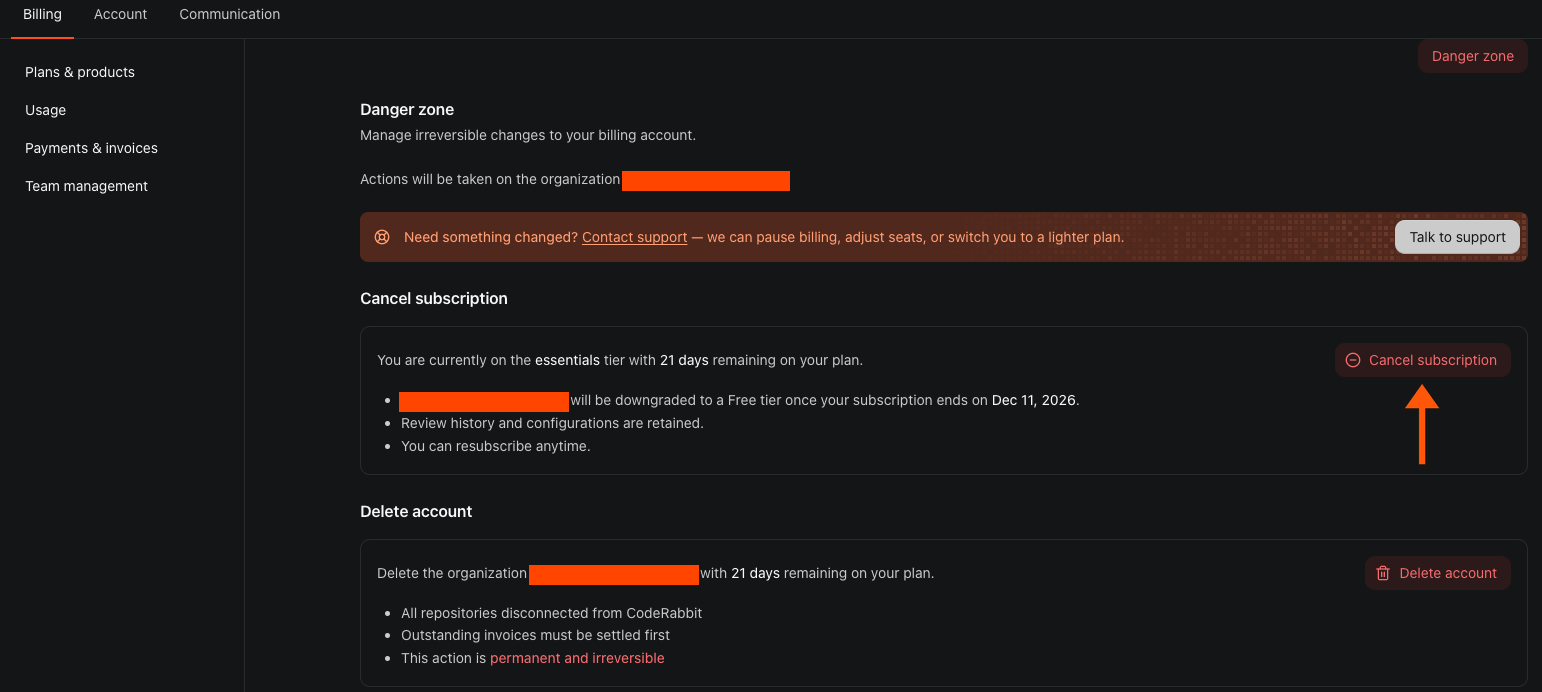
Paid access continues through the end of the current billing cycle. The organization moves to the Free plan at renewal and retains its review history and configuration. If the settings page is read-only, contact an organization Admin or Billing Admin.
For additional questions or concerns, contact CodeRabbit Support.