How do I contact CodeRabbit Support?
Last updated: August 24, 2026
Context
There are several ways to contact CodeRabbit Support. This article outlines the different channels, such as the web form, email, and the in-app help center.
Note that these support channels are intended for customer support related to CodeRabbit products and services. Unrelated requests may be subject to significant delays.
Answer
In-app help center (recommended)
The in-app help center is the most effective way to reach the support team. Access it the CodeRabbit app by clicking your profile in the lower-left of the CodeRabbit app UI. Then click Contact Support to open the in-app help center, where you can chat with our AI agent, submit a ticket, or submit a feature request.
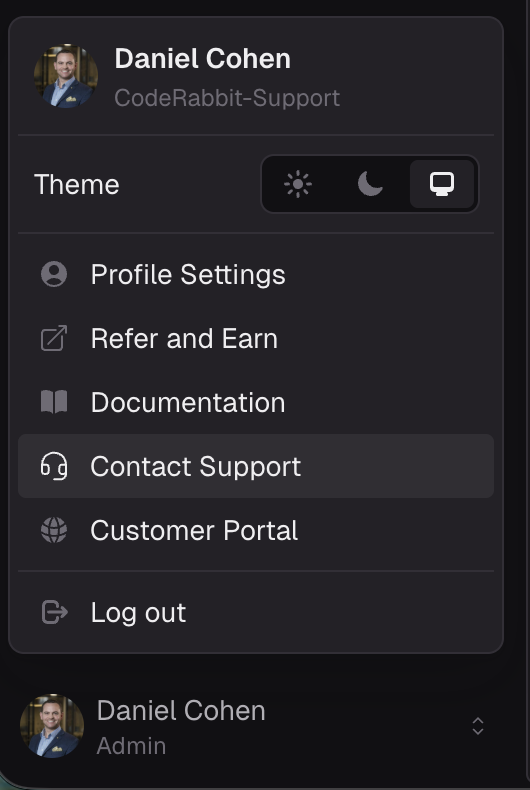 | 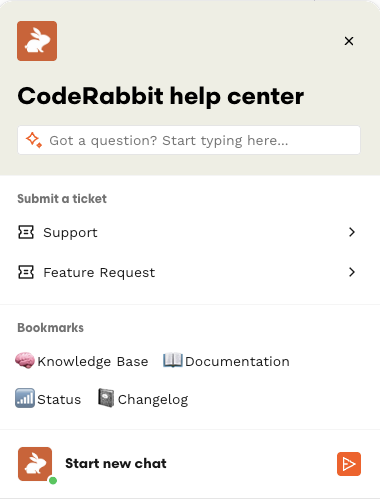 |
Web form
The Contact Support web form is available on CodeRabbit's public website.
Email support is available at support@coderabbit.ai.
Slack & Teams
Shared Slack and Teams channels are available for Enterprise customers. Contact your Customer Success Manager if you do not have a shared Slack channel and wish to set one up.
Note that starting a Slack thread does not automatically raise a ticket. To raise Slack thread as a ticket, participants should tag
@CodeRabbit Supportin the thread or add the ticket 🎫 emoji to the conversation.